How to Work Remotely From a Campervan: 15 Tips for Digital Nomads
Working from a campervan sounds like the perfect setup: a laptop, a view of the mountains, and no commute. The reality is a little messier. A weak signal can drop a client call, a flat battery can end the workday at noon, and a cramped bed-turned-desk can wreck your back within a week.
The good news is that most of these problems are predictable, which means they’re fixable. Here’s how to work remotely from a campervan without sacrificing your income, your sleep, or your sanity.
1. Start With a Van That’s Built for Work, Not Just Sleeping
Most campervans are designed for weekend trips. They prioritize a comfortable bed and a small kitchen, and the “desk” is usually a fold-down dinette table that has to be cleared every time someone wants to eat. That works for a week of light emails. It doesn’t work for 40 hours of focused work.
Before committing to a build or a purchase, it helps to test the lifestyle with a rental. A week or two on the road shows quickly whether a compact layout suits your work style or whether you need more room. Pay attention to where you actually end up working, how often you have to rearrange the space, and whether there’s anywhere to take a call without sitting on the bed.
Remote workers who plan to stay on the road long-term often skip the standard camper layout altogether. A custom-built office van is designed around the workstation first, with a dedicated desk, soundproofed walls, built-in power, and seating that doesn’t double as a mattress. The trade-off is cost and build time, but for someone working full days, a layout planned around productivity tends to pay off quickly in comfort and output.
2. Build a Layered Internet Setup
The Internet is the single biggest point of failure for anyone working from the road. Relying on one source is the fastest way to miss a deadline.
Most experienced van dwellers use a layered approach:
- Primary: a cellular hotspot or 5G router with a generous data plan
- Backup: a second SIM from a different carrier, since coverage gaps rarely overlap
- Off-grid option: satellite internet for remote areas where cell towers don’t reach
- Last resort: campground, cafe, or library Wi-Fi for light tasks
A roof-mounted cellular antenna can also make a real difference in fringe areas, often turning one bar of signal into a usable connection. If your work involves video calls or large file uploads, test your setup at home under realistic conditions before hitting the road.
3. Check Coverage Before You Pick a Campsite
A beautiful campsite with no signal is a vacation spot, not an office. Before driving somewhere new, check your carriers’ coverage maps and read recent reviews on apps that let campers report signal strength at specific locations.
Coverage maps aren’t perfect, so it’s a good idea to have a backup plan nearby. Before settling in for a workweek, note the closest town with a library or coworking space in case the connection turns out to be weaker than advertised.
4. Size Your Power System Around Your Workday
Power is the second most important factor. The easiest way to plan is to add up what you’ll run during a typical workday.
A laptop drawing around 60 watts for eight hours uses roughly 480 watt-hours. Add an external monitor, a router or hotspot, phone charging, a fan, and a 12-volt fridge that runs around the clock, and daily use climbs fast. Lithium batteries have become the standard for work vans because they store more usable energy in less space and handle deep discharges better than older lead-acid batteries.
Solar panels keep the battery topped up on sunny days, while a DC-to-DC charger replenishes it while driving. For cloudy stretches, a powered campsite once or twice a week is a simple safety net.
5. Set Up an Ergonomic Workstation
Hunching over a laptop on a bench seat is fine for an hour. Over months, it leads to neck, shoulder, and wrist pain. The same ergonomic principles that apply in an office apply in a van, and Mayo Clinic’s office ergonomics guide covers the basics well: the top of the screen at or slightly below eye level, wrists straight, upper arms close to the body, and feet flat on the floor or on a footrest. It also recommends getting up and moving regularly, which is easy to forget in a small space.
In practice, that usually means a laptop stand, a separate keyboard and mouse, and a seat with proper back support. Swivel front seats are a popular upgrade because they turn the cab into extra seating facing the workspace. A small lap desk also gives you a second position when you need a change.
6. Separate “Work Mode” From “Sleep Mode”
When the office and the bedroom are the same six square meters, the line between work and rest blurs fast. Creating a ritual that switches the van from one mode to the other helps your brain do the same.
Convert the bed back into a couch if your layout allows it, put work gear away in a dedicated drawer at the end of the day, and change the lighting in the evening. Warm string lights after hours and bright task lighting during work hours make a surprising difference to how the space feels.
7. Control the Climate Without Idling the Engine
A metal van turns into an oven in summer and a fridge in winter, and neither is a good place to concentrate. Good insulation is the foundation, followed by a roof vent fan to move air and a diesel or electric heater for colder months.
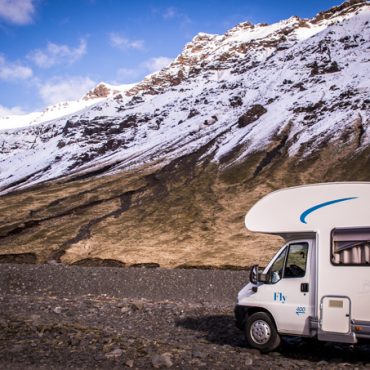
Cold-weather destinations make things more challenging. Heating becomes a real factor, open campsites thin out, and extra gear like thermal sleeping bags moves from optional to essential. That’s one of the main trade-offs when renting a campervan in Iceland outside the summer months.
Avoid idling the engine for heat or air conditioning. It wastes fuel, annoys neighbors, and is banned in many areas. Better options include parking in shade, chasing mild weather, insulated window covers, and battery-powered fans. Some modern builds also run air conditioning directly from the battery bank, which keeps the van cool without the engine running.
8. Build a Routine With an Off Switch
Van life offers both advantages and disadvantages. Without a commute or office hours, work can quietly spill into every part of the day. Many people who have lived this lifestyle say the hardest part of life as a digital nomad isn’t the logistics but the discipline it takes to balance work and exploring.
Set fixed working hours that suit your clients and your energy levels, and protect your time off just as firmly. Front-loading work in the morning frees up afternoons for hiking, swimming, or simply enjoying where you’ve parked, which is the reason most people choose this lifestyle in the first place.
9. Plan Your Parking Around Your Work Schedule
Where you park shapes your entire workday. Developed campgrounds offer hookups and amenities, while free sites offer quiet and space but rarely power. In the US, public land is a popular option for van-based workers, but it comes with rules. The Bureau of Land Management generally limits dispersed camping to 14 days within a 28-day period and requires campers to move a substantial distance once they reach the limit.
For workdays, pick spots with a strong signal, level ground, and enough privacy to take calls. Save the scenic but remote sites for weekends, when staying connected is less important.
10. Never Mix Driving and Working
It’s tempting to squeeze in a call while a partner drives or to check messages at a red light. Don’t. Taking calls or reading messages behind the wheel is a serious risk, and the numbers back it up: according to the National Highway Traffic Safety Administration, distracted driving claimed 3,208 lives in the US in 2024.
The simplest fix is to separate travel days from workdays. Drive on lighter days or weekends, and on workdays, park before you open your laptop. Long drives also drain focus, so treat a big travel day as a half-day of work at most.
11. Prepare to Work Offline
Even the best internet setup will fail eventually. A storm, a crowded campsite, or a dead zone you didn’t expect can cut you off for hours.
Enable offline mode in your document and email apps, download files you’ll need before heading somewhere remote, and keep a short list of tasks that don’t require a connection, such as writing drafts, editing photos, or planning. When the signal drops, you can switch tasks instead of losing the day.
12. Schedule Calls for Your Strongest Signal
Video calls are the most demanding task on a mobile connection. Plan them for times and places where your signal is strongest, and avoid scheduling them on travel days.
Changing time zones adds another layer. A calendar app that shows multiple time zones helps prevent showing up an hour late after crossing a state line. A good headset with noise cancellation also matters in a van, where rain on the roof, wind, and passing traffic can drown out your voice.
13. Protect Your Gear and Your Data
A van holds everything you own, including the tools you earn a living with. A hidden safe or lockable drawer for laptops and hard drives gives you extra security when you leave the van to explore.
On the digital side, use a VPN on public Wi-Fi, keep regular cloud backups, and carry an external drive for important files. Check that your insurance covers both the vehicle and the electronics inside it, since standard auto policies often don’t cover personal belongings.
14. Use Backup Offices on the Road
Spending every day in the van can become monotonous. Coworking spaces, public libraries, and cafes provide reliable internet, a change of scenery, and a chance to talk to someone other than your travel partner.
Many coworking chains offer day passes or memberships that work across multiple cities, which suits a nomadic schedule well. Libraries are a free option with quiet rooms and power outlets, and they’re often the most dependable connection in small towns.
15. Sort Out Mail, Admin, and Taxes Before You Leave
The unglamorous side of working from a van catches many people off guard. Without a fixed home address, receiving mail, renewing a license, or filing taxes gets complicated.
A mail forwarding service can receive and scan your letters, while some full-time travelers establish a legal home base in a state that’s friendly to nomads. Keep digital copies of important documents, and speak with a tax professional about how your work and residency status affect what you owe.
Frequently Asked Questions
Can you really work full-time from a campervan?
Yes, many people work full-time from a campervan, but it requires the right setup. Reliable internet, enough battery capacity for a full workday, and a comfortable workspace are the three essentials. Without them, working full-time from a van quickly becomes stressful and unproductive.
What is the best internet for working from a van?
The best setup combines more than one source. Most remote workers use a cellular hotspot or 5G router as their main connection, a second carrier as backup, and satellite internet for remote areas. Public Wi-Fi works for light tasks but is rarely reliable enough for video calls.
Is satellite internet worth it for van life?
Satellite internet is worth it if you regularly work in remote areas without cell coverage. It opens up campsites that would otherwise be unusable on workdays. If you mostly stay near towns and highways, a strong cellular setup with two carriers is often enough.
How much battery power do you need to work from a campervan?
It depends on your devices, but a laptop alone can use around 480 watt-hours over an eight-hour day. Add a monitor, router, fan, and fridge, and daily needs grow quickly. Add up your devices’ wattage and hours of use to size your battery bank, then plan solar or alternator charging to refill it.
Where can you park a campervan to work during the day?
Good options include campgrounds, public lands where dispersed camping is allowed, and quiet parking near libraries or coworking spaces. Search for spots with a strong signal, level ground, and enough privacy for calls. Always follow local parking rules and posted signs.
What jobs can you do from a campervan?
Any job that only requires a laptop and an internet connection can work from a van. Common examples include writing, design, software development, digital marketing, virtual assistance, and consulting. Jobs with constant video meetings are harder but still possible with a strong internet setup.
How do you take video calls from a van?
Park somewhere with a strong signal, close the windows to cut outside noise, and use a headset with a noise-cancelling microphone. Position the laptop so light falls on your face rather than behind you. Avoid scheduling calls on travel days or in areas where your signal is unreliable.
What is the best van layout for remote work?
The best layout has a dedicated desk that doesn’t need to be cleared for meals or sleep, plus supportive seating. Swivel front seats, a fixed or convertible desk, and good lighting make long workdays far more comfortable. Some remote workers choose layouts built around the office rather than the bed.
Is working from a campervan safe for solo women?
Many women travel and work solo in campervans safely by following a few simple habits. Park in well-reviewed campgrounds or busy areas, trust your instincts if a spot feels wrong, and share your location with someone you trust. Keeping valuables out of sight and always having a backup plan for where to sleep also helps.
How do digital nomads get mail when living in a van?
Most use a mail forwarding service that receives, scans, and forwards letters to wherever they are. Some also use a friend or family member’s address. Full-time travelers often set up a legal home base to handle registration, voting, and taxes.
Conclusion
Working remotely from a campervan is entirely possible, but it rewards preparation far more than improvisation. Get the fundamentals right, including internet, power, an ergonomic workspace, and a van that suits how you actually work, and the rest becomes much easier to manage. Add a routine that protects your time off, and the van stops being a compromise and starts feeling like the best office you’ve ever had.